Simula Research Laboratory /
Center for Resilient Networks and Applications /
NorNet
Homepage of Thomas Dreibholz /
HiPerConTracer Homepage
Simula Research Laboratory /
Center for Resilient Networks and Applications /
NorNet
Homepage of Thomas Dreibholz /
HiPerConTracer Homepage
New release: hipercontracer-2.2.11. This version provides CMakeLists.txt improvements for Homebrew usage, and the removal of an exit() call in libhpctdb.
New release: hipercontracer-2.2.10. It provides improved Python examples, and a Debian test fix.
High-Performance Connectivity Tracer (HiPerConTracer) is a Ping/Traceroute measurement framework.
HiPerConTracer denotes the actual measurement tool. It performs regular Ping and Traceroute runs among sites, featuring:
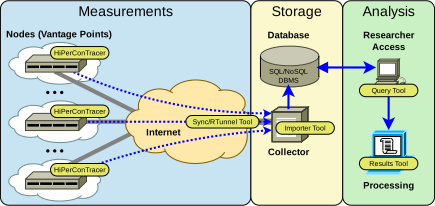
Furthermore, the HiPerConTracer Framework provides additional tools for helping to obtain, process, collect, store, and retrieve measurement data:
Please use the issue tracker at https://github.com/dreibh/hipercontracer/issues to report bugs and issues!
For ready-to-install Ubuntu Linux packages of HiPerConTracer, see Launchpad PPA for Thomas Dreibholz!
sudo apt-add-repository -sy ppa:dreibh/ppa
sudo apt-get update
sudo apt-get install hipercontracer-allFor ready-to-install Fedora Linux packages of HiPerConTracer, see COPR PPA for Thomas Dreibholz!
sudo dnf copr enable -y dreibh/ppa
sudo dnf install hipercontracer-allFor ready-to-install FreeBSD packages of HiPerConTracer, it is included in the ports collection, see FreeBSD ports tree index of benchmarks/hipercontracer/!
sudo pkg install hipercontracerAlternatively, to compile it from the ports sources:
cd /usr/ports/benchmarks/hipercontracer
make
sudo make installHiPerConTracer is released under the GNU General Public License (GPL).
Please use the issue tracker at https://github.com/dreibh/hipercontracer/issues to report bugs and issues!
The Git repository of the HiPerConTracer sources can be found at https://github.com/dreibh/hipercontracer:
git clone https://github.com/dreibh/hipercontracer
cd hipercontracer
sudo ci/get-dependencies --install
cmake .
make
Optionally, for installation to the standard paths (usually under /usr/local):
sudo make install
Note: The script ci/get-dependencies automatically installs the build dependencies under Debian/Ubuntu Linux, Fedora Linux, and FreeBSD. For manual handling of the build dependencies, see the packaging configuration in debian/control (Debian/Ubuntu Linux), hipercontracer.spec (Fedora Linux), and Makefile for FreeBSD.
Contributions:
Issue tracker: https://github.com/dreibh/hipercontracer/issues. Please submit bug reports, issues, questions, etc. in the issue tracker!
Pull Requests for HiPerConTracer: https://github.com/dreibh/hipercontracer/pulls. Your contributions to HiPerConTracer are always welcome!
CI build tests of HiPerConTracer: https://github.com/dreibh/hipercontracer/actions.
Coverity Scan analysis of HiPerConTracer: https://scan.coverity.com/projects/dreibh-hipercontracer.
The tarball has been signed with my GnuPG key 21412672518D8B2D1862EFEF5CD5D12AA0877B49. Its authenticity and integrity can be verified by:
gpg --keyserver hkp://keyserver.ubuntu.com --recv-keys 21412672518D8B2D1862EFEF5CD5D12AA0877B49
gpg --verify hipercontracer-<VERSION>.tar.xz.asc hipercontracer-<VERSION>.tar.xz
The tarballs have been signed with my GnuPG key 21412672518D8B2D1862EFEF5CD5D12AA0877B49. Its authenticity and integrity can be verified by:
gpg --keyserver hkp://keyserver.ubuntu.com --recv-keys 21412672518D8B2D1862EFEF5CD5D12AA0877B49
gpg --verify hipercontracer-<VERSION>.tar.xz.asc hipercontracer-<VERSION>.tar.xz
In the simple case, HiPerConTracer can just be used as a measurement tool without creating special directory setups; to be described in Running a HiPerConTracer Measurement.
For a larger setup, particularly consisting of measurement nodes and/or database import, it is recommended to properly set up storage directories. As current best practices for using the HiPerConTracer framework securely, the following directory structure and file permissions are recommended:
/var/hipercontracer (ownership: hipercontracer:hipercontracer; permissions: 755 = rwxr-xr-x)
/var/hipercontracer/data (ownership: hipercontracer:hpct-nodes; permissions: 755 = rwxr-xr-x)
Storage for data recorded by HiPerConTracer.
/var/hipercontracer/data/node<1-9999>: (ownership: node<1-9999>:hpct-nodes; permissions: 755 = rwxr-xr-x)
Storage for data transferred from a remote Node using the HiPerConTracer Sync Tool. Each of these node directories corresponds to a Node.
Data is stored as node<1-9999>:node<1-9999>. The permissions only allow the users themselves to modify files in their own directory. A node<1-9999> user is not able to modify data of another node<1-9999> user!
/var/hipercontracer/good (ownership: hipercontracer:hpct-nodes; permissions: 755 = rwxr-xr-x)
Storage for data that was successfully imported into a database by using the HiPerConTracer Importer Tool. The Importer moves the data from /var/hipercontracer/data after import.
/var/hipercontracer/bad (ownership: hipercontracer:hpct-nodes; permissions: 755 = rwxr-xr-x)
Storage for data that was not successfully imported into a database by using the HiPerConTracer Importer Tool. The Importer moves the data from /var/hipercontracer/data after import failure.
/etc/hipercontracer/ssh (ownership: hipercontracer:hipercontracer; permissions: 700 = rwx——)
Storage for the SSH private/public key pair, as well as the known_hosts file, on a HiPerConTracer Node, to be used by the HiPerConTracer Sync Tool and the HiPerConTracer Reverse Tunnel Tool.
That is:
sudo mkdir -p -m 755 /var/hipercontracer
sudo chown hipercontracer:hipercontracer /var/hipercontracer
for subDirectory in data good bad ; do
   sudo mkdir -p -m 755 /var/hipercontracer/$subDirectory
   sudo chown hipercontracer:hpct-nodes /var/hipercontracer/$subDirectory
done
sudo mkdir -p -m 700 /var/hipercontracer/ssh
sudo chown hipercontracer:hipercontracer /var/hipercontracer/ssh
/etc/hipercontracer (ownership: root:root; permissions: 755 = rwx——)
Configuration files, e.g. for importer or database.
/var/hipercontracer/data, /var/hipercontracer/good, and /var/hipercontracer/bad:
These directories must be writable for the HiPerConTracer Importer Tool, to allow it to move files owned by node<1-9999>:hpct-nodes without superuser permissions, as well as readable for members of the group hpct-nodes, for reading the node status files:
Linux (POSIX ACLs):
sudo setfacl -Rm d:u:hipercontracer:rwx,u:hipercontracer:rwx,d:g:hpct-nodes:rx,g:hpct-nodes:rx \
   /var/hipercontracer/data /var/hipercontracer/good /var/hipercontracer/bad
FreeBSD (NFSv4 ACLs):
sudo setfacl -Rm u:hipercontracer:modify_set:file_inherit/dir_inherit:allow,g:hpct-nodes:read_set:file_inherit/dir_inherit:allow \
/var/hipercontracer/data /var/hipercontracer/good /var/hipercontracer/badHiPerConTracer is the measurement tool itself.
A simple Ping run, without data storage, from arbitrary local addresses, to all IPv4 and IPv6 addresses of www.heise.de (resolved by DNS) via ICMP (default):
sudo hipercontracer --destination www.heise.de --ping --verbose
Run HiPerConTracer measurement #1000000, from an arbitrary local IPv4 address to destination 193.99.144.80 (www.heise.de), using Traceroute and Ping. Store data into sub-directory data in the current directory; run as current user $USER:
sudo hipercontracer \
   --user $USER -#1000000 \
   --source 0.0.0.0 --destination 193.99.144.80 \
   --traceroute --ping \
   --resultsdirectory data \
   --verbose
Notes:
Run HiPerConTracer as a non-privileged user (--user option). HiPerConTracer only needs superuser permissions to create the raw sockets.
HiPerConTracer uses the sub-directory data (provided by --resultsdirectory) to write the results files to. This directory must be writable for the user $USER!
See the manpage of “hipercontracer” for various options to set Ping and Traceroute intervals, results file lengths, results file compression, etc.:
man hipercontracer
Run HiPerConTracer measurement #1000001, from arbitrary local IPv4 (0.0.0.0) and IPv6 (::) addresses to destinations 193.99.144.80 and 2a02:2e0:3fe:1001:302:: with Traceroute and Ping via ICMP (default). Store results files into sub-directory data in the current directory; run as current user $USER:
sudo hipercontracer \
   --user $USER \
   -#1000001 \
   --source 0.0.0.0 --source :: \
   --destination 193.99.144.80 --destination 2a02:2e0:3fe:1001:302:: \
   --traceroute --ping \
   --resultsdirectory data \
--verboseUnder Linux, it is possible to utilise capabilities to allow HiPerConTracer to use raw sockets without superuser permissions:
sudo setcap cap_net_raw=+ep /usr/bin/hipercontracer
After enabling the cap_net_raw capability, HiPerConTracer can run as unprivileged (i.e. non-root) user:
hipercontracer www.ietf.org --pingSee capabilities(7) — Linux manual page for details!
See the manpage of “hipercontracer” for all options, and Results File Formats for a description of the results file formats.
man hipercontracerAn uncompressed HiPerConTracer results file consists of:
The measurement results within a results file only contain data entries of the same format (i.e. Ping, Traceroute) and version (1 for HiPerConTracer <2.0; 2 otherwise).
See Results File Examples for some examples.
Header format:
#? HPCT format version programIDHeader details:
| Column | Field | Description |
|---|---|---|
| 1 | format | Measurement identifier (e.g. Ping, Traceroute) |
| 2 | version | Version of the output data format (decimal) |
| 3 | programID | Identifier for the program generating the output (e.g. HiPerConTracer/2.1.12) |
Header example:
#? HPCT Ping 2 HiPerConTracer/2.1.12#P<io_module> measurementID sourceIP destinationIP sendTimestamp burstseq traffic_class packet_size response_size checksum sourcePort destinationPort status timesource delay_app_send delay_queuing delay_app_receive rtt_app rtt_sw rtt_hw| Column | Field | Description |
|---|---|---|
| 1 | ping | #P<io_module>, with #Pi = ICMP Ping, #Pu = UDP Ping |
| 2 | measurementID | Measurement identifier (decimal) |
| 3 | sourceIP | Source IP address |
| 4 | destinationIP | Destination IP address |
| 5 | sendTimestamp | Send Timestamp (nanoseconds since the UTC epoch, hexadecimal) |
| 6 | burstseq | Sequence number within a burst (decimal), numbered from 0 |
| 7 | traffic_class | The IP Traffic Class/Type of Service value of the sent packets (hexadecimal) |
| 8 | packet_size | The sent packet size (decimal, in bytes) including IPv4/IPv6 header, transport header and HiPerConTracer header |
| 9 | response_size | The response packet size (decimal, in bytes) including IPv4/IPv6 header, transport header and HiPerConTracer header |
| 10 | checksum | The checksum of the ICMP Echo Request packets (hexadecimal); 0x0000 for other protocols, 0xffff for unknown |
| 11 | sourcePort | Source port, 0 for ICMP (decimal) |
| 12 | destinationPort | Destination port, 0 for ICMP (decimal) |
| 13 | status | Status code (decimal); see Status Code and Status Flags |
| 14 | timesource | Source of the timing information (hexadecimal) as AAQQSSHH; see Time Source |
| 15 | delay_app_send | The measured application send delay (nanoseconds, decimal; -1 if not available) |
| 16 | delay_queuing | The measured kernel software queuing delay (nanoseconds, decimal; -1 if not available) |
| 17 | delay_app_receive | The measured application receive delay (nanoseconds, decimal; -1 if not available) |
| 18 | rtt_app | The measured application RTT (nanoseconds, decimal) |
| 19 | rtt_sw | The measured kernel software RTT (nanoseconds, decimal; -1 if not available) |
| 20 | rtt_hw | The measured kernel hardware RTT (nanoseconds, decimal; -1 if not available) |
#Pi 88888888 10.193.4.168 10.193.4.67 178f2cc6c7ea013a 0 0 44 44 7d61 0 0 255 11666600 36997 6983 50311 426999 332708 -1Version 1 was used before HiPerConTracer 2.0.0 and is now deprecated! However, it can still be read and processed by the HiPerConTracer Results Tool and the HiPerConTracer Importer Tool. While HiPerConTracer still can generate version 1 output, this is strongly discouraged due to limitations of this format version!
#P sourceIP destinationIP sendTimestamp checksum status rtt [traffic_class [packet_size [timesource]]]| Column | Field | Description |
|---|---|---|
| 1 | ping | #P; HiPerConTracer <2.0 only provided ICMP Ping |
| 2 | sourceIP | Source IP address |
| 3 | destinationIP | Destination IP address |
| 4 | sendTimestamp | Send Timestamp (microseconds since the UTC epoch, hexadecimal) |
| 5 | checksum | The checksum of the ICMP Echo Request packets (hexadecimal); 0x0000 for other protocols, 0xffff for unknown |
| 6 | status | Status code (decimal); see Status Code and Status Flags |
| 7 | rtt | The measured RTT (microseconds, decimal) |
| 8 | traffic_class | The IP Traffic Class/Type of Service value of the sent packets (hexadecimal) |
| 9 | packet_size | The sent packet size (decimal, in bytes) including IPv4/IPv6 header, transport header and HiPerConTracer header |
| 10 | timesource | Source of the timing information (hexadecimal) as AAQQSSHH; see Time Source |
Notes:
traffic_class was added in HiPerConTracer 1.4.0.packet_size was added in HiPerConTracer 1.6.0.timesource was added in HiPerConTracer 2.0.0 development versions.#P 2001:700:4100:4::2 2001:250:3801:71::149 5ed91fe263db1 9106 200 5000000 0 6#T<io_module> measurementID sourceIP destinationIP timestamp round totalHops traffic_class packet_size checksum sourcePort destinationPort statusFlags pathHash
⇥sendTimestamp hopNumber response_size status timesource delay_app_send delay_queuing delay_app_receive rtt_app rtt_sw rtt_hw hopIP
⇥...| Column | Field | Description |
|---|---|---|
| 1 | traceroute | #T<io_module>, with #Ti = ICMP Traceroute, #Tu = UDP Traceroute |
| 2 | measurementID | Measurement identifier |
| 3 | sourceIP | Source IP address |
| 4 | destinationIP | Destination IP address |
| 5 | timestamp | Timestamp (nanoseconds since the UTC epoch, hexadecimal) of the current run. Note: This timestamp is only an identifier for the Traceroute run. All Traceroute rounds of the same run use the same timestamp here! The actual send timestamp of the request to each hop can be found in sendTimestamp of the corresponding hop! |
| 6 | round | Round number (decimal) |
| 7 | totalHops | Total hops (decimal) |
| 8 | traffic_class | The IP Traffic Class/Type of Service value of the sent packets (hexadecimal) |
| 9 | packet_size | The sent packet size (decimal, in bytes) including IPv4/IPv6 header, transport header and HiPerConTracer header |
| 10 | checksum | The checksum of the ICMP Echo Request packets (hexadecimal); 0x0000 for other protocols, 0xffff for unknown |
| 11 | sourcePort | Source port, 0 for ICMP (decimal) |
| 12 | destinationPort | Destination port, 0 for ICMP (decimal) |
| 13 | statusFlags | Status flags including the status code for Ping above for the lower 8 bits (hexadecimal); see Status Code and Status Flags |
| 14 | pathHash | Hash of the path (hexadecimal); see Path Hash |
For each hop:
| Column | Field | Description |
|---|---|---|
| 1 | sendTimestamp | Timestamp (nanoseconds since the UTC epoch, hexadecimal) for the request to this hop |
| 2 | hopNumber | Number of the hop |
| 3 | response_size | The response packet size (decimal, in bytes) including IPv4/IPv6 header, transport header and HiPerConTracer header |
| 4 | status | Status code (decimal; the values are the same as for Ping, see Status Code and Status Flags) |
| 5 | timesource | Source of the timing information (hexadecimal) as AAQQSSHH; see Time Source |
| 6 | delay_app_send | The measured application send delay (nanoseconds, decimal; -1 if not available) |
| 7 | delay_queuing | The measured kernel software queuing delay (nanoseconds, decimal; -1 if not available) |
| 8 | delay_app_receive | The measured application receive delay (nanoseconds, decimal; -1 if not available) |
| 9 | rtt_app | The measured application RTT (nanoseconds, decimal) |
| 10 | rtt_sw | The measured kernel software RTT (nanoseconds, decimal; -1 if not available) |
| 11 | rtt_hw | The measured kernel hardware RTT (nanoseconds, decimal; -1 if not available) |
| 12 | hopIP | Hop IP address |
#Ti 12345678 10.44.33.111 1.1.1.1 1795a9a23c629fbf 0 11 0 44 90e1 0 0 200 a7cfb997ef00d133
⇥1795a9a23c629fbf 1 56 1 116666aa 117720 19410 40428729 57465605 16899746 16778688 10.44.32.1
⇥1795a9a23c5919e1 2 56 1 116666aa 117473 18421 40878737 56759042 15744411 15665625 10.42.241.24
⇥1795a9a23c28493f 3 56 1 116666aa 119417 19180 59070590 59398475 189288 132438 10.42.241.1
⇥1795a9a23b66efe6 4 56 1 116666aa 569585 18709 67972981 69165724 604449 481875 158.36.144.49
⇥1795a9a24305dce5 5 56 1 116666aa 74164 13164 10927655 12438014 1423031 1370062 10.42.240.11
⇥1795a9a242fdee25 6 56 1 116666aa 74629 12132 11430786 12039303 521756 467438 158.36.84.53
⇥1795a9a242f3ae6c 7 56 1 116666aa 74315 11634 11205225 13171634 1880460 1787750 128.39.230.22
⇥1795a9a2426f70c5 8 96 1 116666aa 51574 9678 19737124 20904021 1105645 1060562 128.39.254.179
⇥1795a9a244849c7e 9 56 1 116666aa 93468 16452 15676158 16511633 725555 687625 128.39.254.79
⇥1795a9a2447bdf7e 10 56 1 116666aa 92733 15981 12837025 17723353 4777614 4718312 185.1.55.41
⇥1795a9a2447335b4 11 44 255 116666aa 85299 13915 16096643 17068626 872769 802375 1.1.1.1
Version 1 was used before HiPerConTracer 2.0.0 and is now deprecated! However, it can still be read and processed by the HiPerConTracer Results Tool and the HiPerConTracer Importer Tool. While HiPerConTracer still can generate version 1 output, this is strongly discouraged due to limitations of this format version!
#T sourceIP destinationIP timestamp round checksum totalHops statusFlags pathHash [traffic_class [packet_size]]
⇥hopNumber status rtt hopIP [timesource]
⇥...| Column | Field | Description |
|---|---|---|
| 1 | traceroute | #T; HiPerConTracer <2.0 only provided ICMP Traceroute |
| 2 | sourceIP | Source IP address |
| 3 | destinationIP | Destination IP address |
| 4 | timestamp | Timestamp (microseconds since the UTC epoch, hexadecimal) of the current run. Note: This timestamp is only an identifier for the Traceroute run. All Traceroute rounds of the same run use the same timestamp here! |
| 5 | round | Round number (decimal) |
| 6 | checksum | The checksum of the ICMP Echo Request packets (hexadecimal); 0x0000 for other protocols, 0xffff for unknown |
| 7 | totalHops | Total hops (decimal) |
| 8 | statusFlags | Status flags including the status code for Ping above for the lower 8 bits (hexadecimal) |
| 9 | pathHash | Hash of the path (hexadecimal); see Path Hash |
| 10 | traffic_class | The IP Traffic Class/Type of Service value of the sent packets (hexadecimal) |
| 11 | packet_size | The sent packet size (decimal, in bytes) including IPv4/IPv6 header, transport header and HiPerConTracer header |
For each hop:
| Column | Field | Description |
|---|---|---|
| 1 | hopNumber | Number of the hop |
| 2 | status | Status code (in hexadecimal here) |
| 3 | rtt | The measured RTT (microseconds, decimal) |
| 4 | hopIP | Hop IP address |
| 5 | timesource | Source of the timing information (hexadecimal) as AAQQSSHH; see Time Source |
Notes:
traffic_class was added in HiPerConTracer 1.4.0.packet_size was added in HiPerConTracer 1.6.0.timesource was added in HiPerConTracer 2.0.0 development versions.#T 192.168.0.88 8.8.8.8 5d2f2db8ecbb3 0 2be 12 200 ea86903f1fdb8faa 0 44
⇥1 1 9858 192.168.0.1
⇥2 1 18552 10.248.0.1
⇥3 1 18573 84.208.41.118
⇥4 1 18595 109.163.76.161
⇥5 1 18618 109.163.76.160
⇥6 1 18641 62.115.175.156
⇥7 1 24116 62.115.116.101
⇥8 1 24135 62.115.142.219
⇥9 1 24157 72.14.205.198
⇥10 1 24179 142.251.67.181
⇥11 1 18755 142.250.239.185
⇥12 ff 18863 8.8.8.8The status code provides the result of a Ping, i.e. whether the remote endpoint responded or there was a local or on-route error, as an unsigned byte:
| Status Code | Description | Meaning of the Corresponding RTT Value |
|---|---|---|
| 1 | ICMP/ICMPv6 response: Time Exceeded | Response from router sending the ICMP error |
| 100 | ICMP/ICMPv6 response: Unreachable scope | Response from router sending the ICMP error |
| 101 | ICMP/ICMPv6 response: Unreachable network | Response from router sending the ICMP error |
| 102 | ICMP/ICMPv6 response: Unreachable host | Response from router sending the ICMP error |
| 103 | ICMP/ICMPv6 response: Unreachable protocol | Response from router sending the ICMP error |
| 104 | ICMP/ICMPv6 response: Unreachable port | Response from router sending the ICMP error |
| 105 | ICMP/ICMPv6 response: Unreachable, prohibited (firewall) | Response from router sending the ICMP error |
| 110 | ICMP/ICMPv6 response: Unreachable, unknown reason | Response from router sending the ICMP error |
| 200 | Timeout (no response from a router) | Timeout value configured for HiPerConTracer |
| 210 | sendto() call failed (generic error) | RTT is set to 0 |
| 211 | sendto() error: tried to send to broadcast address (EACCES) | RTT is set to 0 |
| 212 | sendto() error: network unreachable (ENETUNREACH) | RTT is set to 0 |
| 213 | sendto() error: host unreachable (HOSTUNREACH) | RTT is set to 0 |
| 214 | sendto() error: address not available (ADDRNOTAVAIL) | RTT is set to 0 |
| 215 | sendto() error: invalid message size (MSGSIZE) | RTT is set to 0 |
| 216 | sendto() error: not enough buffer space (NOBUFS) | RTT is set to 0 |
| 255 | Success (destination has responded) | The actual RTT to the destination |
The status flag extends the status code, by providing an overall result of a Traceroute run consisting of multiple Ping measurements. That is: StatusCode := (StatusFlags & 0xff).
| Status Flag | Description |
|---|---|
| 0x100 | Route with “*” (at least one router did not respond; see also Path Hash) |
| 0x200 | Destination has responded |
The time source provides the source of the recorded timing information as hexadecimal 4-byte unsigned integer AAQQSSHH:
| Component | Description |
|---|---|
| AA | Application |
| Queuing (queuing packet until sending it by driver, in software) | |
| SS | Software (sending request by driver until receiving response by driver) |
| HW | Hardware (sending request by NIC until receiving response by NIC) |
Each byte AA, QQ, SS, HH provides the receive time source (upper nibble) and send time source (lower nibble):
| Nibble | Description |
|---|---|
| 0x0 | Not available |
| 0x1 | System clock |
| 0x2 | SO_TIMESTAMPING socket option, microseconds granularity |
| 0x3 | SO_TIMESTAMPINGNS socket option (or SO_TIMESTAMPING+SO_TS_CLOCK), nanoseconds granularity |
| 0x4 | SIOCGSTAMP ioctl, microseconds granularity |
| 0x5 | SIOCGSTAMPNS ioctl, nanoseconds granularity |
| 0x6 | SO_TIMESTAMPING socket option, in software, nanoseconds granularity |
| 0xa | SO_TIMESTAMPING socket option, in hardware, nanoseconds granularity |
For details, particularly also see: Dreibholz, Thomas: «High-Precision Round-Trip Time Measurements in the Internet with HiPerConTracer» (PDF, 12474 KiB, 7 pages, 🇬🇧), in Proceedings of the 31st International Conference on Software, Telecommunications and Computer Networks (SoftCOM), DOI 10.23919/SoftCOM58365.2023.10271612, ISBN 979-8-3503-0107-6, Split, Dalmacija/Croatia, September 22, 2023.
The path hash is an SHA-1 hash over the textual representation of a Traceroute run, i.e. SHA1(“<Source IP>-<Router 1 IP>-<…>-<Router n IP>-<Destination IP>”), where the IP addresses correspond to source, destination, and routers. If a router is unknown, it is represented by “*”. The purpose of the path hash is to quickly identify identical paths. In this case, of course, routers must have consistently responded (non-“*”, i.e. revealing their IP address) or not responded (“*”) to lead to the same hash value.
Some simple results file examples (from src/results-examples):
Notes:
The HiPerConTracer Viewer Tool displays the contents of a results file.
hpct-viewer src/results-examples/Traceroute-UDP-#88888888-fdb6:6d27:be73:4::50-20231018T102656.821891-000000001.hpct.xzSee the manpage of “hpct-viewer” for a detailed description of the available options:
man hpct-viewerThe HiPerConTracer Results Tool allows merging and converting data from results files, e.g. to create a Comma-Separated Value (CSV) file.
Merge the data from all files matching the pattern Ping*.hpct.* into CSV file ping.csv.gz, with “,” as separator:
find data -maxdepth 1 -name "Ping*.hpct.*" | \
   hpct-results --input-file-names-from-stdin --separator=, -o ping.csv.gz
Hint: You can use the extension .gz for GZip, .bz2 for BZip2, .xz for XZ, .zst for ZSTD, or none for uncompressed output into the output CSV file!
Merge the data from all files matching the pattern Traceroute*.hpct.* into CSV file traceroute.csv.xz, with “;” as separator:
find data -maxdepth 1 -name "Traceroute*.hpct.*" | \
hpct-results --input-file-names-from-stdin --separator=; -o traceroute.csv.xzSee the manpage of “hpct-results” for a detailed description of the available options:
man hpct-results
The directory src/results-examples contains some example results files, as well as some example scripts for reading them and computing some statistics.
The GNU R examples need, in addition to GNU R, some libraries. See src/results-examples/r-install-dependencies to get the necessary library packages installed from the Comprehensive R Archive Network (CRAN)!
Alternatively:
Ubuntu/Debian:
sudo apt install -y r-base-core r-cran-data.table r-cran-digest r-cran-dplyr r-cran-nanotime r-cran-xtableFedora:
sudo dnf install -y R-core R-data.table R-digest R-dplyr R-nanotime R-xtableFreeBSD:
sudo pkg install -y R R-cran-data.table R-cran-digest R-cran-dplyr R-cran-xtable
Note: R-cran-nanotime is missing in FreeBSD; it still needs to be installed from CRAN!
See r-ping-example for the script, and src/results-examples for some example results files! The Ping example creates a statistical summary table for each Measurement ID / Source IP / Destination IP / Protocol relation found in the given input results file(s).
Usage:
./r-ping-example <input> <output_prefix>With a HiPerConTracer Ping results file as input:
./r-ping-example \
   Ping-P13735-2001:700:4100:4::2-20221012T142120.713761-000003330.hpct.bz2 \
   output
Note: The script calls the HiPerConTracer Results Tool for processing of the input file. It therefore must be installed.
The example script creates a set of 3 output files:
output.csv: A summary table as CSV file.output.html: A summary table as HTML file.output.tex: A summary table as LaTeX file, for inclusion into a LaTeX publication.All HiPerConTracer Ping results files in a directory with a directory as input:
./r-ping-example . outputNote:
.”, i.e. the current directory) is searched for all HiPerConTracer Ping results files.With a CSV file as input:
./r-ping-example ping.csv output
Note: ping.csv has to be created in advance from HiPerConTracer Ping results, e.g. using the HiPerConTracer Results Tool.
See r-traceroute-example for the script, and src/results-examples for some example results files! The Traceroute example simply counts the number of HiPerConTracer Traceroute runs for each Measurement ID / Source IP / Destination IP / Protocol relation found in the given input results file(s).
Usage:
./r-traceroute-example <input>With HiPerConTracer Traceroute results file as input:
./r-traceroute-example \
   Traceroute-UDP-#88888888-10.193.4.168-20231018T102656.814657-000000001.hpct.xz
Note: The script calls the HiPerConTracer Results Tool for processing of the input file. It therefore must be installed.
All HiPerConTracer Traceroute results files in a directory with a directory as input:
./r-traceroute-example .Note: The script calls the HiPerConTracer Results Tool for processing of the input file. It therefore must be installed.
With a CSV file as input:
./r-traceroute-example traceroute.csv
Note: traceroute.csv has to be created in advance from HiPerConTracer Traceroute results, e.g. using the HiPerConTracer Results Tool.
Import CSV file into spreadsheet.
Hints:
See src/SQL and src/NoSQL for schema, user and permission setups. Create the database of your choice (MariaDB/MySQL, PostgreSQL, or MongoDB).
Use separate users for importer (import access only), researcher (read-only access to the data) and maintainer (full access), for improved security.
Hint: The HiPerConTracer tools support Transport Layer Security (TLS) configuration. It is strongly recommended to properly set up TLS for secure access to a database!
See src/TestDB as example. This is the CI test, which includes a full database setup and test cycle with all supported database backends. Of course, this setup also includes proper TLS setup as well.
The HiPerConTracer Importer Tool provides the continuous storage of collected measurement data from results files into SQL or NoSQL databases. Currently, database backends for MariaDB/MySQL, PostgreSQL and MongoDB are provided.
See src/hipercontracer-importer.conf (importer configuration) and src/hipercontracer-database.conf (database configuration) for examples. Make sure that the database access details are correct, so that the Importer Tool and the Query Tool can connect to the right database and have the required permissions! See src/SQL and src/NoSQL for schema, user and permission setups. Use the HiPerConTracer Database Shell tool to verify and debug access.
Note: Make sure the data directory, as well as the directory for good imports and the directory for bad (i.e. failed) imports exist and are accessible by the user running the importer!
Just run one import round, quit when there are no more files to import:
hpct-importer \
   --importer-config hipercontracer-importer.conf \
   --database-config hipercontracer-database.conf \
   --verbose \
--quit-when-idleContinuously run, waiting for new files to import:
hpct-importer \
   --importer-config hipercontracer-importer.conf \
   --database-config hipercontracer-database.conf \
   --verbose
Note: If running without --quit-when-idle (recommended), the importer keeps running and imports new files as soon as they appear in the results directory. The importer uses INotify!
See the manpage of “hpct-importer” for a detailed description of the available options:
man hpct-importer
See src/hipercontracer-database.conf for an example. Make sure that the database access details are correct, so that the Query Tool can connect to the right database and has the required permissions! See src/SQL and src/NoSQL for schema, user and permission setups. Use the HiPerConTracer Database Shell tool to verify and debug access.
Export all Ping data to ping.hpct.gz (GZip-compressed data file):
hpct-query ~/testdb-users-mariadb-researcher.conf ping -o ping.hpct.gzNotes:
Export all Ping data of Measurement ID #1000 to ping.hpct.gz (GZip-compressed data file):
hpct-query ~/testdb-users-mariadb-researcher.conf \
   ping -o ping.hpct.gz \
   --from-measurement-id 1000 --to-measurement-id 1000
Export all Traceroute data of Measurement ID #1000 to traceroute.hpct.bz2 (BZip2-compressed data file), with verbose logging:
hpct-query ~/testdb-users-mariadb-researcher.conf \
   traceroute -o traceroute.hpct.bz2 --loglevel 0 \
   --from-measurement-id 1000 --to-measurement-id 1000
Export all Traceroute data from 2023-09-22 00:00:00 to traceroute.hpct.xz (XZ-compressed data file), with verbose logging:
hpct-query ~/testdb-users-mariadb-researcher.conf \
   traceroute -o traceroute.hpct.xz --verbose \
   --from-time "2023-09-22 00:00:00"
Export all Traceroute data from time interval [2023-09-22 00:00:00, 2023-09-23 00:00:00) to traceroute.hpct.xz (XZ-compressed data file):
hpct-query ~/testdb-users-mariadb-researcher.conf \
   traceroute -o traceroute.hpct.xz --verbose \
   --from-time "2023-09-22 00:00:00" --to-time "2023-09-23 00:00:00"
Note: Data for time stamp 2023-09-23 00:00:00 will not be included, only data for time stamps less than 2023-09-23 00:00:00, i.e. data within the time interval [to-time, from-time). This ensures the possibility to e.g. export daily batches without having the same value included in two files!
See the manpage of “hpct-query” for a detailed description of the available options:
man hpct-queryThe HiPerConTracer Sync Tool helps synchronising collected results files from a vantage point (denoted as HiPerConTracer Node) to a collection server (denoted as HiPerConTracer Collector), using RSync/SSH.
For information about the necessary underlying directory structure and file permissions, see Recommended Directory Structure and File Permissions. In case of problems, a misconfiguration of these is the most likely issue!
Synchronise results files, with the following settings:
/var/hipercontracer;/var/hipercontracer (here, the data is going to be stored in sub-directory “1000”);/var/hipercontracer/ssh/id_ed25519;/var/hipercontracer/ssh/known_hosts;sudo -u hipercontracer hpct-sync \
--nodeid 1000 \
--collector sognsvann.domain.example \
--local /var/hipercontracer --remote /var/hipercontracer \
--key /var/hipercontracer/ssh/id_ed25519 \
--known-hosts /var/hipercontracer/ssh/known_hosts --verboseSee the manpage of “hpct-sync” for a detailed description of the available options:
man hpct-syncThe HiPerConTracer Reverse Tunnel (RTunnel) Tool maintains a reverse SSH tunnel from a remote HiPerConTracer Node to a HiPerConTracer Collector server. The purpose is to allow for SSH login from the Collector server to the Node, via this reverse tunnel. Then, the Node does not need a publicly reachable IP address (e.g. a Node only having a private IP address behind a NAT/PAT firewall).
For information about the necessary underlying directory structure and file permissions, see Recommended Directory Structure and File Permissions. In case of problems, a misconfiguration of these is the most likely issue!
Establish a Reverse Tunnel, with the following settings:
/var/hipercontracer/ssh/id_ed25519;/var/hipercontracer/ssh/known_hosts.sudo -u hipercontracer hpct-rtunnel \
--nodeid 1000 --collector 10.44.35.16 \
--key /var/hipercontracer/ssh/id_ed25519 \
--known-hosts /var/hipercontracer/ssh/known_hostsOn the Collector, to connect to Node 1000:
hpct-ssh <USER>@1000See the manpage of “hpct-rtunnel” for a detailed description of the available options:
man hpct-rtunnelAlso see the manpage of “hpct-ssh” for a detailed description of the available options:
man hpct-sshThe HiPerConTracer Collector/Node Tools are some scripts for simplifying the setup of Nodes and a Collector server. Mainly, they ensure the creation of Node configurations on the Collector, and corresponding setup of the HiPerConTracer Sync Tool and the HiPerConTracer Reverse Tunnel Tool.
See the manpages of these tools for further details!
For information about the necessary underlying directory structure and file permissions, see Recommended Directory Structure and File Permissions. In case of problems, a misconfiguration of these is the most likely issue!
The HiPerConTracer Trigger Tool triggers HiPerConTracer measurements in the reverse direction, when a given number of Pings having a given size reach the local node.
Queue a received Ping’s sender address after having received 2 Pings of 88 bytes for a Traceroute measurement from 10.1.1.51, run as user hipercontracer and use results directory “/var/hipercontracer”:
sudo hpct-trigger \
   --user hipercontracer \
   --source 10.1.1.51 \
   --resultsdirectory=/var/hipercontracer \
   --traceroute \
   --triggerpingsbeforequeuing 2 --triggerpingpacketsize 88 \
--verboseSee the manpage of “hpct-trigger” for a detailed description of the available options:
man hpct-triggerThe HiPerConTracer Database Shell (DBShell) is a simple tool to test a database configuration file by running a database client with the settings from the file. It then provides an interactive shell for the database.
Connect to the database, using the configuration from hipercontracer-importer.conf:
dbshell hipercontracer-importer.confAs Example 1, but also export the database configuration as DBeaver configuration files (JSON for database, plain-text JSON for user credentials) with the prefix “dbeaver-config”:
dbshell hipercontracer-database.conf --write-dbeaver-config dbeaver-configSee the manpage of “dbshell” for a detailed description of the available options:
man dbshellThe HiPerConTracer Database Tools are some helper scripts to e.g. join HiPerConTracer database configurations into an existing DBeaver configuration:
See the manpages of these tools for further details!
The HiPerConTracer UDP Echo Server provides a UDP Echo (RFC 862) service, particularly as endpoint of HiPerConTracer Ping and Traceroute measurements over UDP.
Important security notes:
Start UDP Echo server on port 7777:
udp-echo-server --port 7777A corresponding HiPerConTracer Ping measurement via UDP to this server could be run like:
sudo hipercontracer -D <SERVER_ADDRESS> -M UDP --ping --verbose --pingudpdestinationport 7777Start UDP Echo server on port 7 as user hipercontracer:
sudo udp-echo-server --user hipercontracer --port 7See the manpage of “udp-echo-server” for a detailed description of the available options:
man udp-echo-serverThe Wireshark network protocol analyzer provides built-in support for the HiPerConTracer packet format. This support is already included upstream, i.e. Wireshark provides it out-of-the-box.
To decode HiPerConTracer packets, particularly over UDP, it may be necessary to configure “Decode As” rules. Wireshark has to rely on heuristics for UDP. They may fail to recognise the HiPerConTracer payload. The “Decode As” rules configuration in the “Analyze” menu allows users to set explicit rules for UDP ports (e.g. 7, 10001) for decoding matching packets as HiPerConTracer payload.
Coloring rules, filters and “Decode As” rules can be found in the directory hipercontracer/src/wireshark. Simply copy colorfilters, dfilters, decode_as_entries, and optionally preferences to $HOME/.wireshark.
HiPerConTracer BibTeX entries can be found in hipercontracer.bib!
Dreibholz, Thomas: «HiPerConTracer - A Versatile Tool for IP Connectivity Tracing in Multi-Path Setups» (PDF, 4898 KiB, 6 pages, 🇬🇧), in Proceedings of the 28th IEEE International Conference on Software, Telecommunications and Computer Networks (SoftCOM), pp. 1–6, DOI 10.23919/SoftCOM50211.2020.9238278, ISBN 978-953-290-099-6, Hvar, Dalmacija/Croatia, September 17, 2020.
Dreibholz, Thomas: «High-Precision Round-Trip Time Measurements in the Internet with HiPerConTracer» (PDF, 12474 KiB, 7 pages, 🇬🇧), in Proceedings of the 31st International Conference on Software, Telecommunications and Computer Networks (SoftCOM), DOI 10.23919/SoftCOM58365.2023.10271612, ISBN 979-8-3503-0107-6, Split, Dalmacija/Croatia, September 22, 2023.
The collected BibTeX references in a single file are available as: BiBTeX file, XML file, ODT file, DOCX file. These lists were generated using BibTeXCov 2.0!
Dreibholz, Thomas; Michelinakis, Foivos Ioannis and Čičić, Tarik: ``A Sleepless Night over the Atlantic Ocean – Analysing the Satellite Network Connectivity during a Trans-Atlantic Flight´´ (PDF, 9822 KiB, 13 pages, 🇬🇧), in Proceedings of the 8th International Workshop on Recent Advances for Multi-Clouds and Mobile Edge Computing (M2EC) in conjunction with the 40th International Conference on Advanced Information Networking and Applications (AINA), pp. 175–187, Springer Nature, DOI 10.1007/978-3-032-23347-9_15, ISBN 978-3-032-23347-9, Wellington/New Zealand, April 8, 2026, [BibTeX, XML]. Awarded with the Best Workshops Paper Award.
Keywords: HiPerConTracer, In-Flight Internet, Jitter, Network, Ping, Round-Trip Time, Satellite Communication, Traceroute
Abstract: Today, most applications rely on ubiquitous, reliable, and fast Internet access to provide their services. While network performance in mobile broadband networks is well-researched, in-flight satellite communication is still an open topic. In-flight Internet access offers various service possibilities, from entertainment to shopping, for both passengers as well as service operators. This particularly applies to long-haul flights, where passengers have plenty of time. Clearly, stable connectivity allows to offload application functionalities from a passenger's mobile device to edge and cloud servers. But how is the performance of today's network connectivity on airplanes, i.e. what can the application developer expect?
In this paper, we examine a detailed HiPerConTracer dataset, collected on a trans-Atlantic night flight between New York, U.S.A. and Oslo, Norway. Particularly, we show some interesting insights into the performance available, as well as the limitations of today's in-flight satellite communication. Furthermore, the dataset, as well as the software for obtaining and processing the data, is published as open data and open source software.
URL: https://web-backend.simula.no/sites/default/files/2026-01/M2EC2026.pdf
MD5: da38d334008fa96c877e50306f90eb2b
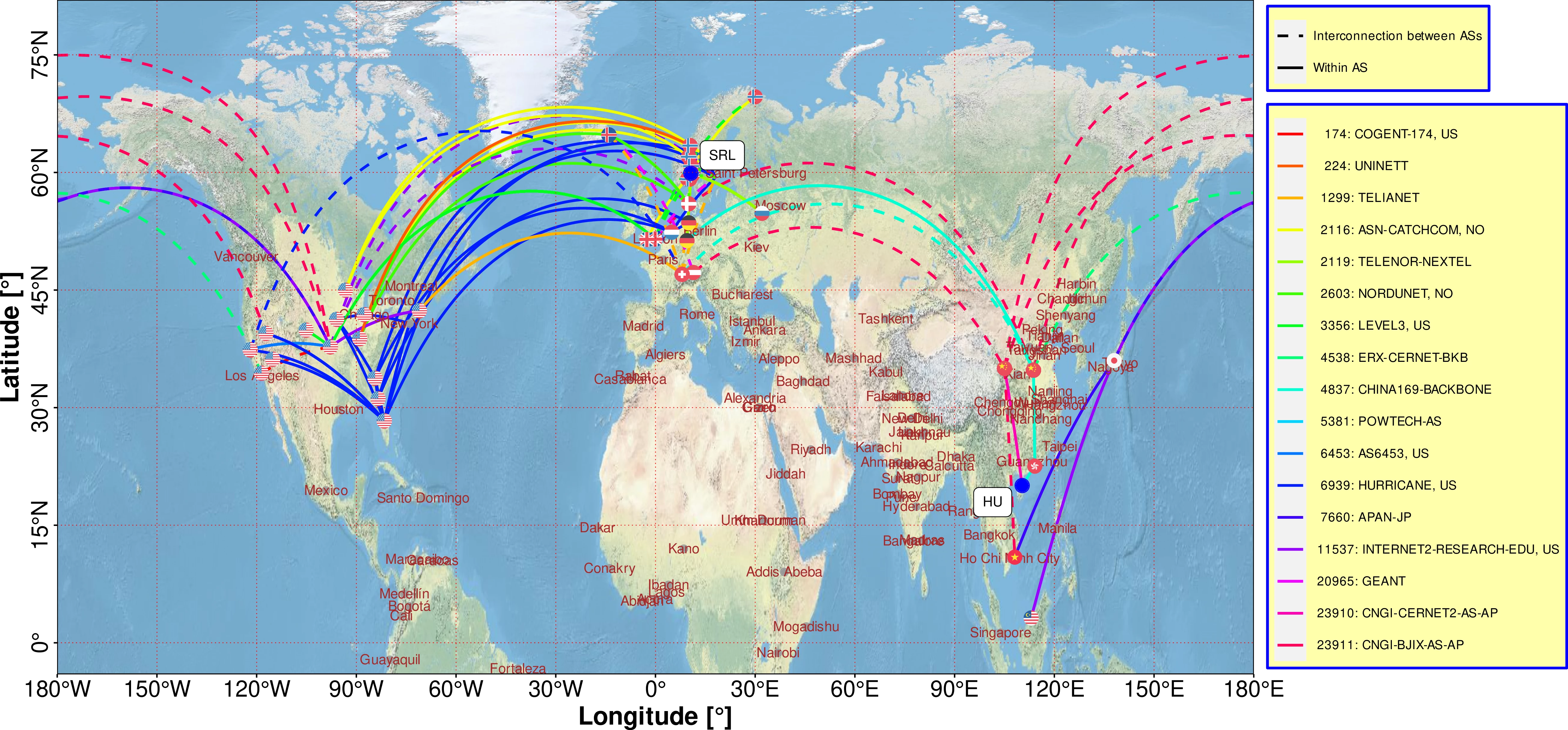
Dreibholz, Thomas and Mazumdar, Somnath: ``Tracing Data Packet Paths over the Internet using Traceroute´´ (PDF, 22445 KiB, 19 pages, 🇬🇧), ArXiv, Simula Metropolitan Center for Digital Engineering, Centre for Resilient Networks and Applications (CRNA), DOI 10.48550/arXiv.2602.09857, February 10, 2026, [BibTeX, XML].
Keywords: Internet Protocol, Packets, Path, Round-Trip Time, Traceroute, Ping
Abstract: Network communication using the Internet Protocol (IP) is a pillar of modern Internet applications. IP allows data packets to travel the world through a complex set of interconnected computer networks managed by different operators. How IP-based data communication changes over time can be interesting from an end-system's perspective without relying on underlying network providers. This article presents an extensive, trace-driven analysis of user data traffic (covering five years of observations, six large Internet service providers (covering research, business and consumer category type), twenty autonomous systems, and fourteen countries.
Our three primary findings are: i users data packet transmission paths are not deterministic and does not always select the geographically shortest path; ii) user packets take different routes that cover many countries and detour between two fixed points. Even after changing the types of Internet service provider type (e.g., from commercial to research), the routing can differ significantly between two locations. iii) Packet transmission delay can be influenced by changing the Internet service provider and IP protocol versions (i.e., from IPv4 to IPv6).
URL: https://arxiv.org/pdf/2602.09857
MD5: a3efa74edd7fa546c0000ce6be68481b
Dreibholz, Thomas: ``Satellite Network Connectivity during a Trans-Atlantic Flight´´, IEEE DataPort, DOI 10.21227/q0xf-t853, January 30, 2026, [BibTeX, XML].
Keywords: Latency, Kernel Tuning, HiPerConTracer
Abstract: This repository contains a dataset with HiPerConTracer performance data and OSM Tracker GNSS tracking of a trans-Atlantic flight between New York - John F. Kennedy (JFK) and Oslo - Gardermoen (OSL).
URL: https://ieee-dataport.org/documents/satellite-network-connectivity-during-trans-atlantic-flight
MD5: 25b8cff0e5e7e42407af32f500c009db
Ahmed, Azza Hassan Mohamed; Dreibholz, Thomas; Michelinakis, Foivos Ioannis and Čičić, Tarik: ``Open 5G Testbed: A Cyber Range Platform for Security Research´´ (PDF, 798 KiB, 8 pages, 🇬🇧), in Proceedings of the 18th Workshop on Cyber Security Experimentation and Test (CSET) in conjunction with the 41st Annual Computer Security Applications Conference (ACSAC), pp. 579–586, DOI 10.1109/ACSACW69556.2025.00067, ISBN 979-8-3315-4536-9, Honolulu, Hawaii/U.S.A., December 8, 2025, [BibTeX, XML].
Keywords: 5G Testbed, Cyber Range, Security, Experimentation, Virtualization, Open-Source
Abstract: The fifth generation (5G) of wireless communication offers gigabit-per-second speeds, ultra-low latency, and massive device connectivity. However, the introduction of network function virtualization (NFV), software-defined networking (SDN), network slicing, and mobile edge computing (MEC) has also created a complex security frontier. Addressing these challenges requires continuous and realistic validation of defenses in controlled experimentation environments. In this paper, we present an open-source, low-cost, fully software-based 5G testbed designed as a cyber range platform for security research and education. Built upon the OpenAirInterface (OAI) framework and commercial off-the-shelf hardware, the testbed supports an end-to-end 5G Stand-Alone (SA) deployment with gNodeB, core network, and user equipment (UE). It enables reproducible experimentation that may demonstrate a broad range of security scenarios, including privacy and tracking-based vulnerabilities (e.g., capturing user identifiers) as well as availability attacks such as DoS attacks targeting core network functions.
The paper outlines our reproducible implementation and shares our experiences in building and operating the platform as a cyber range.
URL: https://web-backend.simula.no/sites/default/files/2025-12/CSET2025.pdf
MD5: 0f2e763cc299988acb9c093e429cb994
Dreibholz, Thomas: ``HiPerConTracer: A Versatile Tool for Obtaining Insights into Today's Communication Networks´´ (PDF, 6477 KiB, 20 pages, 🇬🇧), Presentation at the 2nd Simula Knowledge Festival, Simula Research Laboratory, Oslo/Norway, June 12, 2025, [BibTeX, XML].
Keywords: HiPerConTracer, Networks, Latency, Delay, Round-Trip Time, Ping, Traceroute, Jitter, Measurements
Abstract: Today, many applications running on our devices depend on network communication. The expectation of a user, as well as of the application developers, is that the network "somehow" transports the data between devices and remote systems, i.e. in particular reliably, without much delay, and almost everywhere when using a mobile device. But are these expectations realistic? How can the performance of the underlying networks be evaluated? How does the underlying network structure actually look like? And are there short-term and long-term changes? Obviously, there are many interesting research questions!The goal of this talk is to present an introduction and live demonstration of our open source framework High-Performance Connectivity Tracer (HiPerConTracer). HiPerConTracer can be utilised to perform short-term as well as long-term analysis of networks, scaling from small intranet setups to large-scale distributed environments, in order to obtain detailed insights into the structure and performance metrics (delay, jitter) of communication networks. As part of the live demonstration, it is particularly intended to show how the framework can be set up in own environments, and how to collect information about the networks used for own applications.
URL: https://web-backend.simula.no/sites/default/files/2025-06/SKF2025.pdf
MD5: 72fb3021c2febf8c72a9a632f930b451
Evang, Jan Marius; Dreibholz, Thomas and Mazumdar, Somnath: ``Measuring Mobile Network Coverage during Extended Road Trips in the Nordics´´ (PDF, 4302 KiB, 8 pages, 🇬🇧), in Proceedings of the 15th IFIP International Workshop on Resilient Networks Design and Modeling (RNDM), pp. 1–8, DOI 10.1109/RNDM66856.2025.11073801, ISBN 979-8-3315-8497-9, Trondheim, Trøndelag/Norway, June 11, 2025, [BibTeX, XML].
Keywords: 5G, Networks, Variability, Service Quality, Roaming, Reliability
Abstract: Modern smartphones, equipped with advanced mobile network technologies, deliver substantial computing capabilities, but they are energy-constrained because of battery capacity limitations. It is now feasible to offload computationally demanding tasks to cloud and fog computing infrastructures to overcome this limitation. A reliable network connection is required for stable communication between mobile devices and cloud or fog systems. This experimental campaign examines the reliability of mobile network connectivity during prolonged road trips, spanning approximately 44,000 km across Norway, Sweden, Denmark, Estonia, and Finland. We collected long-term latency and loss data to evaluate service quality and roaming performance, including cross-border transitions. Our findings reveal significant variability in network reliability, with frequent roaming events in certain countries, and occasional long service outages lasting up to 680 s. These results highlight the challenges of maintaining uninterrupted connectivity for critical services, in dynamic environments. This study provides a foundation for further large-scale investigations into mobile network resilience beyond the Nordic countries.
URL: https://web-backend.simula.no/sites/default/files/2025-06/RNDM2025.pdf
MD5: 3a2a02481be4d119f98c91cd87515aa6
Evang, Jan Marius and Dreibholz, Thomas: ``Measuring Mobile Network Coverage during Extended Road Trips in the Nordics´´, IEEE DataPort, DOI 10.21227/zdmm-ee93, May 26, 2025, [BibTeX, XML].
Keywords: 4G, 5G Dataset, 5G-V2X, Cellular Measurements
Abstract: Modern smartphones, equipped with advanced mo- bile network technologies, deliver substantial computing ca- pabilities, but they are energy-constrained because of battery capacity limitations. It is now feasible to offload computationally demanding tasks to cloud and fog computing infrastructures to overcome this limitation. A reliable network connection is required for stable communication between mobile devices and cloud or fog systems. This experimental campaign examines the reliability of mobile network connectivity during prolonged road trips, spanning approximately 44,000 km across Norway, Sweden, Denmark, Estonia, and Finland. We collected long-term latency and loss data to evaluate service quality and roaming performance, including cross-border transitions. Our findings reveal significant variability in network reliability, with frequent roaming events in certain countries, and occasional long service outages lasting up to 680 s. These results highlight the challenges of maintaining uninterrupted connectivity for critical services, in dynamic environments. This study provides a foundation for further large-scale investigations into mobile network resilience beyond the Nordic countries.
MD5: 6200abdf9eb57db4a956af2a102a9336
Dreibholz, Thomas and Mazumdar, Somnath: ``HiPerConTracer 3.0: Transport-level Packet Routing Analysis Tool´´ (PDF, 5349 KiB, 9 pages, 🇬🇧), in Proceedings of the 33rd Euromicro International Conference on Parallel, Distributed and Network-Based Processing (PDP), pp. 33–41, DOI 10.1109/PDP66500.2025.00014, ISBN 979-8-3315-2493-7, Torino, Piemonte/Italy, March 14, 2025, [BibTeX, XML].
Keywords: Long-Term Analysis, Network, Packets, Routing, Round-Trip Time, Traceroute
Abstract: Applications rely on the network to reliably forward packets between nodes. The way packets are forwarded has a significant impact on latency-sensitive applications. It is important to gain a better understanding of the routes the packets take, to adapt an application's communication to network performance, and to achieve good quality of experience (QoE) for the user. Continuous, long-term evaluation is required to obtain detailed insights into network performance.
Here, we present HiPerConTracer 3.0 for tracing routes between senders and receivers in public and private networks. This open-source tool for large-scale IP trace analysis performs traceroute/ping measurements to provide detailed insights into packet routes and packet timing. In this paper, we have demonstrated the intuitive route visualization capability of the proposed tool by verifying some known network behaviors.
URL: https://web-backend.simula.no/sites/default/files/2025-02/PDP2025.pdf
MD5: 5958ae5a77cbe4da76bad8f48f34f180
Dreibholz, Thomas: ``Cloud and Fog: How and Where is My Data Flowing? Obtaining Insights into Data Privacy in Today's Applications´´ (PDF, 14384 KiB, 23 pages, 🇬🇧), Invited Talk at Copenhagen Business School (CBS), Fredriksberg/Denmark, April 26, 2024, [BibTeX, XML].
Keywords: Cloud, Fog, Privacy, Networking, Routing, Traceroute, HiPerConTracer
Abstract: In today's applications, network access is almost ubiquitous: While users interact with their applications on the smartphone – anywhere and anytime – many tasks are actually offloaded to cloud/fog systems for processing somewhere else, mostly unknown by the users. So, a lot of user data continuously flows around the world, between cities, countries and continents. This talk intends to provide some interesting insights into privacy-relevant networking aspects of cloud/fog applications, without requiring detailed computer networking knowledge.
URL: https://web-backend.simula.no/sites/default/files/2024-04/CBSTalk2024.pdf
MD5: a1e26306386ce8ef176e278dfbcca44c
Evang, Jan Marius and Dreibholz, Thomas: ``Optimizing Network Latency: Unveiling the Impact of Reflection Server Tuning´´ (PDF, 422 KiB, 11 pages, 🇬🇧), in Proceedings of the 6th International Workshop on Recent Advances for Multi-Clouds and Mobile Edge Computing (M2EC) in conjunction with the 38th International Conference on Advanced Information Networking and Applications (AINA), pp. 374–384, DOI 10.1007/978-3-031-57942-4_3, ISBN 978-3-031-57942-4, Kitakyushu, Fukuoka/Japan, April 18, 2024, [BibTeX, XML].
Keywords: Latency, Kernel Tuning, HiPerConTracer
Abstract: This study investigates the dynamics of network latency optimizations, with a focus on the role of reflection server tuning. In an era marked by the demand for precise and low-latency network measurements, our exploration unveils the interplay of diverse parameters in achieving optimal performance. Notably, the implementation of a tuned profile on Linux emerges as a standout strategy, showcasing significant rewards in network efficiency. We highlight the importance of early acceptance of latency-critical traffic in the firewall chain and emphasize the cumulative impact of various optimizations. These findings have practical implications for network administrators and system architects, providing valuable insights for the deployment of efficient and low-latency network infrastructures, essential in the landscape of emerging technologies such as 5G networks and edge computing solutions.
URL: https://web-backend.simula.no/sites/default/files/2024-02/M2EC2024.pdf
MD5: b77b88c046472082a9fb635befcda1bd
Evang, Jan Marius and Dreibholz, Thomas: ``Reflection Server Tuning Dataset´´, IEEE DataPort, DOI 10.21227/8wbz-7e29, February 2, 2024, [BibTeX, XML].
Keywords: Latency, Kernel Tuning, HiPerConTracer
Abstract: The Reflection Server Tuning dataset contains HiPerConTracer latency measurements performed in a lab setup. The purpose of the dataset is to measure the latency and jitter effects of firewalls and Linux kernel tuning.
URL: https://ieee-dataport.org/documents/reflection-server-tuning-dataset
MD5: 95742bd6815d272b3b01d2a3a9337562
Dreibholz, Thomas and Mazumdar, Somnath: ``TARTAN Traceroute Dataset´´, IEEE DataPort, DOI 10.21227/a241-gm35, November 9, 2023, [BibTeX, XML].
Keywords: Cloud Computing, Quality of Service, Privacy, Internet, Packets, Routing
Abstract: The Transport-level pAcket RouTing ANalysis Tool for Cloud-native Applications (TARTAN) Dataset contains TARTAN/HiPerConTracer Traceroute runs between an endpoint in Oslo, Norway and the public Comprehensive TeX Archive Network (CTAN, https://www.ctan.org) and Comprehensive R Archive Network (CRAN, https://cran.r-project.org) mirror web servers, using ICMP and TCP as Transport Layer protocols. The data has been collected between August and October 2023. 3 rounds of Traceroute runs have been performed every 300 s. Both, IPv4 and IPv6 data have been collected. The purpose of the dataset is to show the changes of routes over time between a private endpoint and public web servers in different countries.
URL: https://ieee-dataport.org/documents/tartan-traceroute-dataset
MD5: b78afa7e33149ff119a9d79acae39ad3
Dreibholz, Thomas: ``A Live Demonstration of HiPerConTracer 2.0´´ (PDF, 1909 KiB, 3 pages, 🇬🇧), in Proceedings of the 31st International Conference on Software, Telecommunications and Computer Networks (SoftCOM), Split, Dalmacija/Croatia, September 22, 2023, [BibTeX, XML].
Keywords: Internet, Round-Trip Time, Traceroute, Measurement, Tools, HiPerConTracer
Abstract: HiPerConTracer is an open source tool for large-scale, long-term, high-frequency Ping and Traceroute measurements. Using such measurements, it is possible to obtain information about latency in the network, as well as about the actual routing. This proposed live demo provides an overview over the tool and its features, as well as an introduction of how to use it for performing measurements, storing the results, querying selected results, and post-processing them for visualisation.
URL: https://web-backend.simula.no/sites/default/files/2023-10/SoftCOM2023-Demo_0.pdf
MD5: ab326fd72248f5fcbeb717c5a7095283
Dreibholz, Thomas: ``High-Precision Round-Trip Time Measurements in the Internet with HiPerConTracer´´ (PDF, 12474 KiB, 7 pages, 🇬🇧), in Proceedings of the 31st International Conference on Software, Telecommunications and Computer Networks (SoftCOM), DOI 10.23919/SoftCOM58365.2023.10271612, ISBN 979-8-3503-0107-6, Split, Dalmacija/Croatia, September 22, 2023, [BibTeX, XML].
Keywords: Internet, Round-Trip Time, Packet Timestamping, Measurement, Tools, HiPerConTracer
Abstract: Accurately measuring Round-Trip Times (RTT) for Internet communications is important for various research topics, ranging from protocol performance and congestion control to routing and network security. Unix systems, particularly Linux and FreeBSD, provide some features to obtain network packet timing information, but there is a lack of documentation for these. With High-Performance Connectivity Tracer (HiPerConTracer), there is already an open source tool for running large-scale, long-running and high-frequency ICMP Ping and Traceroute measurements. However, it lacks support of high-precision timing.
As part of this paper, first the network packet timestamping features of Unix systems are analysed and introduced, to provide the reader with a detailed overview over the available methods, their usage, as well as their limitations. Then, enhancements to HiPerConTracer are presented for adding high-precision timestamping support, as well as a UDP module to also perform UDP Ping and Traceroute measurements. Finally, the newly added features are demonstrated in a proof-of-concept analysis.
URL: https://web-backend.simula.no/sites/default/files/2023-10/SoftCOM2023-Timestamping.pdf
MD5: 99b0c36bb661d436dfc2c7fadc81c7d1
Mazumdar, Somnath and Dreibholz, Thomas: ``Towards a Privacy Preserving Data Flow Control via Packet Header Marking´´ (PDF, 2009 KiB, 8 pages, 🇬🇧), in Proceedings of the 24th IEEE International Conference on High Performance Computing, Data, and Analytics (HPCC), pp. 1509–1516, DOI 10.1109/HPCC-DSS-SmartCity-DependSys57074.2022.00232, ISBN 979-8-3503-1993-4, Chengdu, Sichuan/People's Republic of China, December 18, 2022, [BibTeX, XML].
Keywords: Cloud, Data, Fog, P4, Packets, Privacy, Routing
Abstract: Computing infrastructure is becoming ubiquitous thanks to the advancement in computing and the network domain. Reliable network communication is essential to offer good quality services, but it is not trivial. There are privacy concerns. Metadata may leak user information even if traffic is encrypted. Some countries have data privacy preserving-related regulations, but end-users cannot control through which path, networks, and hardware their data packets should travel. Even worse, the user cannot declare their privacy preferences. This paper presents an approach to tackle such privacy issues through data privacy-aware routing. The user can specify their preferences for packet routing using marking and filtering. Routing can work according to such specifications. It is implemented by P4, allowing a vendor-independent realisation with standard off-the-shelf hardware and open-source software components. We presented the initial experimental results of a proof-of-concept run on a unified cloud/fog research testbed.
URL: https://web-backend.simula.no/sites/default/files/publications/files/hpcc2022.pdf
MD5: e4736c18f80bee8084c75a587f6c7e0a
Mazumdar, Somnath and Dreibholz, Thomas: ``Secure Embedded Living: Towards a Self-contained User Data Preserving Framework´´ (PDF, 336 KiB, 7 pages, 🇬🇧), in IEEE Communications Magazine, vol. 60, no. 11, pp. 74–80, DOI 10.1109/MCOM.001.2200165, ISSN 0163-6804, November 11, 2022, [BibTeX, XML].
Keywords: IoTs, Cloud, Blockchain, Data, Security, User
Abstract: Smart living represents the hardware-software co-inhabiting with humans for better living standards and improved well-being. Here, hardware monitors human activities (by collecting data) specific to a context. Such data can be processed to offer context-specific valuable insights. Such insights can be used for optimising the well-being, living experience and energy cost of smart homes. This paper proposes a Secure Embedded Living Framework (SELF) that enforces a privacy-preserving data control mechanism by integrating multiple technologies, such as Internet-of-thing, cloud/fog platform, machine learning and blockchain. The primary aim of the SELF is to allow the user to retain more control of its data.
URL: https://web-backend.simula.no/sites/default/files/publications/files/commmag2022.pdf
MD5: aee5a6a9043799f00b9836ce7cafd8d4
Dreibholz, Thomas and Mazumdar, Somnath: ``Find Out: How Do Your Data Packets Travel?´´ (PDF, 7239 KiB, 5 pages, 🇬🇧), in Proceedings of the 18th IEEE International Conference on Network and Service Management (CNSM), pp. 359–363, DOI 10.23919/CNSM55787.2022.9965091, ISBN 978-3-903176-51-5, Thessaloniki, Greece, November 1, 2022, [BibTeX, XML].
Keywords: Internet, Connectivity, Routing, Data, Packets, Traffic Paths
Abstract: In today's communication-centric world, users generate and exchange a massive amount of data. The Internet helps user data to travel from one part of the world to another, via a complex set of network systems. These systems are intelligent, heterogeneous, and non-transparent to users. This paper presents an extensive, trace-driven study of user data traffic covering five years of observations, six large ISPs, 22 different autonomous systems, and a total of 12 countries. This work aims to make users aware of how their data travels in the Internet, as the interests of ISPs majorly influence the data traffic path. Although data traffic should prefer to travel through countries that share land borders, we found that the shortest land distance between the two countries does not impact data path selection.
URL: https://web-backend.simula.no/sites/default/files/publications/files/cnsm2022.pdf
MD5: 1a49b8096e6f7d92d50d2ff98836db4c
Michelinakis, Foivos Ioannis; Pujol-Roig, Joan Sebastià; Malacarne, Sara; Xie, Min; Dreibholz, Thomas; Majumdar, Sayantini; Poe, Wint Yi; Patounas, Georgios; Guerrero, Carmen; Elmokashfi, Ahmed Mustafa and Theodorou, Vasileios: ``AI Anomaly Detection for Cloudified Mobile Core Architectures´´ (PDF, 9658 KiB, 16 pages, 🇬🇧), in Transactions on Network and Service Management (TNSM), IEEE Computer Society, DOI 10.1109/TNSM.2022.3203246, ISSN 1932-4537, Los Alamitos, California/U.S.A., August 31, 2022, [BibTeX, XML].
Keywords: Anomaly Detection, Autoencoders, Deep Learning, 5G, AI, Smart Networks, Mobile Networks
Abstract: IT systems monitoring is a crucial process for managing and orchestrating network resources, allowing network providers to rapidly detect and react to most impediment causing network degradation. However, the high growth in size and complexity of current operational networks (2022) demands new solutions to process huge amounts of data (including alarms) reliably and swiftly. Further, as the network becomes progressively more virtualized, the hosting of nfv on cloud environments adds a magnitude of possible bottlenecks outside the control of the service owners. In this paper, we propose two deep learning anomaly detection solutions that leverage service exposure and apply it to automate the detection of service degradation and root cause discovery in a cloudified mobile network that is orchestrated by ETSI OSM. A testbed is built to validate these AI models. The testbed collects monitoring data from the OSM monitoring module, which is then exposed to the external AI anomaly detection modules, tuned to identify the anomalies and the network services causing them. The deep learning solutions are tested using various artificially induced bottlenecks. The AI solutions are shown to correctly detect anomalies and identify the network components involved in the bottlenecks, with certain limitations in a particular type of bottlenecks. A discussion of the right monitoring tools to identify concrete bottlenecks is provided.
URL: https://web-backend.simula.no/sites/default/files/publications/files/tnsm2022.pdf
MD5: 47e525a56f9c1cfd27c249601bdb8c3b
Dreibholz, Thomas: ``HiPerConTracer - A Versatile Tool for IP Connectivity Tracing in Multi-Path Setups´´ (PDF, 4898 KiB, 6 pages, 🇬🇧), in Proceedings of the 28th IEEE International Conference on Software, Telecommunications and Computer Networks (SoftCOM), pp. 1–6, DOI 10.23919/SoftCOM50211.2020.9238278, ISBN 978-953-290-099-6, Hvar, Dalmacija/Croatia, September 17, 2020, [BibTeX, XML].
Keywords: HiPerConTracer, Traceroute, Ping, Multi-Path Transport, NorNet, NorNet Core
Abstract: Nowadays, we see a steadily increasing number of Internet devices with connections to multiple networks. For example, every smartphone provides mobile broadband and Wi-Fi connectivity. Multi-path transport protocols, like MPTCP, CMT-SCTP or Multipath-QUIC, allow for utilising all connected networks simultaneously. However, while there is a lot of research on the Transport Layer aspects of multi-path transport, there is not much work on the Network Layer perspective, yet.
In this paper, we introduce our Open Source tool HiPerConTracer (High-Performance Connectivity Tracer) for efficient, parallelised, long-term measurements of the path connectivity characteristics among multi-homed Internet systems. HiPerConTracer is now running as a permanent feature in the NorNet Core infrastructure, which is used for research on multi-homed systems, and in particular for research on multi-path transport. Based on the HiPerConTracer data collected in NorNet Core so far, we finally present some interesting results from the analysis of the inter-continental site connectivity between China and Norway in January 2020.
URL: https://web-backend.simula.no/sites/default/files/2024-06/SoftCOM2020-HiPerConTracer.pdf
MD5: 676791cf458caa2e9f21688227fc6219
Golkar, Forough; Dreibholz, Thomas and Kvalbein, Amund: ``Measuring and Comparing Internet Path Stability in IPv4 and IPv6´´ (PDF, 436 KiB, 5 pages, 🇬🇧), in Proceedings of the 5th IEEE International Conference on the Network of the Future (NoF), pp. 1–5, DOI 10.1109/NOF.2014.7119767, ISBN 978-1-4799-7531-0, Paris/France, December 4, 2014, [BibTeX, XML]. Awarded with the Best Paper Award.
Keywords: NorNet Core, Internet, IPv4, IPv6, Path Stability, Resilience, Robustness
Abstract: In just about 4 years, IPv6 will celebrate its 20th anniversary. While the protocol itself is already quite old, its deployment has only recently picked up speed. Not so many Internet service providers offer direct IPv6 connectivity to their customers, yet. Clearly, when IPv6 is available to customers, they expect that IPv6 offers at least the same – or even better – stability of connections in comparison to IPv4. The main goal of this paper is to investigate whether this is true today.
In our paper, we present up-to-date measurement results on the stability of IPv4 and IPv6 paths in the real Internet, based on machines that are distributed over a large geographical area, as part of the NorNet Core testbed infrastructure for multi-homed systems. The measurements not only cover high-speed research networks, but also consumer-grade ADSL connections – i.e. the ISP connection types of "normal" end-users – as well as a broad range of different ISPs. The measurements show that IPv6 paths are less stable than corresponding IPv4 paths. We also find that the use of load balancing is more prevalent in IPv6 than in IPv4.
URL: https://web-backend.simula.no/sites/default/files/publications/Simula.simula.3048.pdf
MD5: e94bfd5f13ed1ab81ac86b90fc1bbfe1


