Simula Research Laboratory /
Center for Resilient Networks and Applications /
NorNet
Homepage of Thomas Dreibholz /
BibTeXConv Homepage
Simula Research Laboratory /
Center for Resilient Networks and Applications /
NorNet
Homepage of Thomas Dreibholz /
BibTeXConv Homepage
New release: bibtexconv-2.2.5. This version provides some build script updates, now also allowing to build under Debian/GNU Hurd. Furthermore, the examples are updated.
New release: bibtexconv-2.2.4. This version provides some build improvements and fixes, particularly for NetBSD, OpenBSD, and Solaris.
BibTeXConv is a BibTeX file converter which allows exporting BibTeX entries to other formats, including custom-defined text output. Furthermore, it provides the possibility to check URLs (including MD5, size and MIME type computations) and to verify ISBN and ISSN numbers.
Take a look in /usr/share/doc/bibtexconv/examples/ (or the corresponding path of your system) for example export scripts. The export scripts contain the commands which are read by bibtexconv from standard input.
Check URLs of all entries in ExampleReferences.bib, add MD5, size and MIME type items and write the results to UpdatedReferences.bib:
bibtexconv ExampleReferences.bib \
   --export-to-bibtex=UpdatedReferences.bib \
   --check-urls --only-check-new-urls --non-interactive
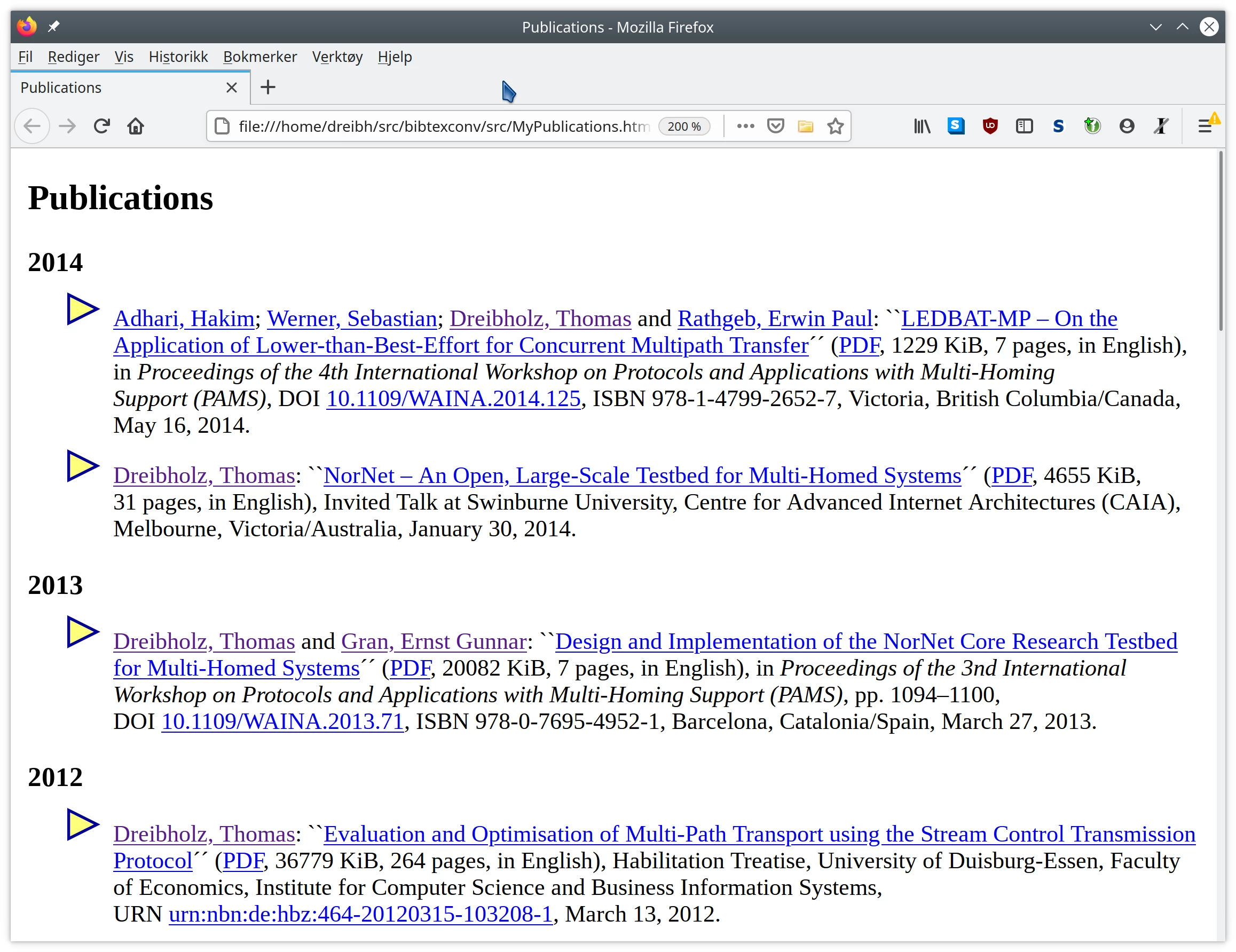
Use the export script web-example1.export to export references from ExampleReferences.bib to MyPublications1.html as XHTML 1.1. ExampleReferences.bib references the script get-author-url and the list authors.list to obtain the authors’ website URLs:
bibtexconv ExampleReferences.bib \
   <web-example1.export >MyPublications1.html
Note that using a script is slow, and may introduce a security issue when running export scripts from untrusted sources! The preferred way for mappings is to use mapping files, which is demonstrated by the next example.
Use the export script web-example2.export to export references from ExampleReferences.bib to MyPublications2.html as XHTML 1.1. Unlike the example above, it reads authors.list as a mapping file, and uses the fields Name and URL to map authors to URLs:
bibtexconv ExampleReferences.bib \
   --mapping=author-url:authors.list:Name:URL \
   <web-example2.export >MyPublications2.html
Mapping files have been introduced in BibTeXConv 2.0.
Use the export script text-example.export to export references from ExampleReferences.bib to MyPublications.txt as plain text:
bibtexconv ExampleReferences.bib \
   <text-example.export >MyPublications.txt
Use the export script yaml-example.export to export references from ExampleReferences.bib to MyPublications.yaml as YAML file according to Debian Upstream MEtadata GAthered with YAml (UMEGAYA) format:
bibtexconv ExampleReferences.bib \
   <yaml-example.export >MyPublications.yaml
Use the export script md-example.export to export references from ExampleReferences.bib to MyPublications.md as Markdown file with authors.list as a mapping file for the authors to URLs:
bibtexconv ExampleReferences.bib \
   --mapping=author-url:authors.list:Name:URL \
   <md-example.export >MyPublications.md
Convert all references in ExampleReferences.bib to XML references to be includable in IETF Internet Drafts. For each reference, a separate file is generated, named with the prefix “reference.” (for example: reference.Globecom2010.xml for the reference Globecom2010):
bibtexconv ExampleReferences.bib \
   --export-to-separate-xmls=reference. --non-interactive
Convert all references in ExampleReferences.bib to BibTeX references. For each reference, a separate file is generated, named with the prefix “” (here: no prefix; for example: Globecom2010.bib for the reference Globecom2010):
bibtexconv ExampleReferences.bib \
   --export-to-separate-bibtexs= --non-interactive
Download all references in ExampleReferences.bib providing a url entry to the Downloads directory. If the corresponding file already exists, a download is skipped. That is, the command can be run regularly to maintain an up-to-date publications directory. Updated references (including length, type and MD5 sum of the downloaded entries) are written to UpdatedReferences.bib:
bibtexconv ExampleReferences.bib \
   --export-to-bibtex=UpdatedReferences.bib \
   --check-urls --store-downloads=Downloads --non-interactive
Use the export script odt-example.export to export references from ExampleReferences.bib to MyPublications.odt as OpenDocument Text (ODT), according to the template ODT file ODT-Template.odt:
bibtexconv-odt ODT-Template.odt MyPublications.odt \
   ExampleReferences.bib odt-example.export
ODT is the native format of LibreOffice/OpenOffice. However, LibreOffice/OpenOffice can also be used to convert it to Microsoft Word (DOCX) format, either via the GUI or on the command line to MyPublications.docx:
soffice --convert-to docx MyPublications.odtAlso take a look into the manual pages of BibTeXConv and BibTeXConv-ODT for further information and options:
man bibtexconv
man bibtexconv-odtPlease use the issue tracker at https://github.com/dreibh/bibtexconv/issues to report bugs and issues!
For ready-to-install Ubuntu Linux packages of BibTeXConv, see the Launchpad PPA for Thomas Dreibholz!
sudo apt-add-repository -sy ppa:dreibh/ppa
sudo apt-get update
sudo apt-get install bibtexconvFor ready-to-install Debian Linux packages of BibTeXConv, see the Open Build Service PPA for Thomas Dreibholz!
Add the PPA repository:
. /etc/os-release
DISTRIBUTION="Debian_${VERSION_ID:-$([ "${VERSION_CODENAME:-}" = sid ] && echo Unstable || echo Testing)}"
URL="https://download.opensuse.org/repositories/home:/dreibh/${DISTRIBUTION}"
KEY="/etc/apt/keyrings/dreibh-obs.gpg"

curl -fsSL "${URL}/Release.key" | sudo gpg --batch --yes --dearmor -o "${KEY}"
printf "deb [signed-by=%s] %s/ /\ndeb-src [signed-by=%s] %s/ /\n" "${KEY}" "${URL}" "${KEY}" "${URL}" | \
   sudo tee /etc/apt/sources.list.d/obs-dreibh.list
sudo apt update
Then, install BibTeXConv:
sudo apt-get install bibtexconvFor ready-to-install Fedora Linux packages of BibTeXConv, see the COPR PPA for Thomas Dreibholz!
sudo dnf copr enable -y dreibh/ppa
sudo dnf install bibtexconvFor ready-to-install OpenSUSE Linux packages of BibTeXConv, see the Open Build Service PPA for Thomas Dreibholz!
Add the PPA repository:
. /etc/os-release
[[ $VERSION_ID =~ ^[0-9]+\.[0-9]+$ ]] && DISTRIBUTION="${VERSION_ID}" || DISTRIBUTION="${NAME// /_}"
URL="https://download.opensuse.org/repositories/home:/dreibh/${DISTRIBUTION}"
rpm --import "${URL}/repodata/repomd.xml.key"
zypper addrepo -f "${URL}/" dreibh-obs
Then, install BibTeXConv:
sudo zypper install bibtexconvFor ready-to-install Alpine Linux packages of BibTeXConv, see the Open Build Service PPA for Thomas Dreibholz!
Add the PPA repository:
DISTRIBUTION="Alpine_Latest_community"
URL="https://download.opensuse.org/repositories/home:/dreibh"
wget -O \
   /etc/apk/keys/home:dreibh@build.opensuse.org-527a4e72.rsa.pub \
   "${URL}/${DISTRIBUTION}/x86_64/home:dreibh%40build.opensuse.org-527a4e72.rsa.pub"
if ! grep -q "^${URL}/${DISTRIBUTION}" /etc/apk/repositories ; then
   echo "${URL}/${DISTRIBUTION}" | sudo tee -a /etc/apk/repositories
fi
Then, install BibTeXConv:
sudo apk add bibtexconvFor ready-to-install FreeBSD packages of BibTeXConv, it is included in the ports collection; see FreeBSD ports tree index of converters/bibtexconv/!
sudo pkg install bibtexconvAlternatively, to compile it from the ports sources:
cd /usr/ports/converters/bibtexconv
make
sudo make installBibTeXConv supports NetBSD. However, there is no NetBSD packaging yet. Just build from sources!
BibTeXConv supports OpenBSD. However, there is no OpenBSD packaging yet. Just build from sources!
BibTeXConv supports Solaris (OpenIndiana). However, there is no Solaris packaging yet. Just build from sources!
BibTeXConv supports GNU Hurd (Debian GNU/Hurd). However, there is no Debian GNU/Hurd PPA on Open Build Service available yet. Just build from sources!
For the Homebrew formula of BibTeXConv, see Thomas Dreibholz’s Homebrew Tap!
Add tap:
brew tap dreibh/tap
brew trust dreibh/tap
Then, install BibTeXConv:
brew install bibtexconvBibTeXConv is released under the GNU General Public License (GPL).
Please use the issue tracker at https://github.com/dreibh/bibtexconv/issues to report bugs and issues!
The Git repository of the BibTeXConv sources can be found at https://github.com/dreibh/bibtexconv:
git clone https://github.com/dreibh/bibtexconv
cd bibtexconv
sudo ci/get-dependencies --install
cmake .
make
Optionally, for installation to the standard paths (usually under /usr/local):
sudo make install
Note: The script ci/get-dependencies automatically installs the build dependencies under Debian/Ubuntu Linux, Fedora Linux, OpenSUSE Linux, Alpine Linux, FreeBSD, and Debian GNU/Hurd. For manual handling of the build dependencies, take a look at the packaging configuration files:
debian/control (Debian/Ubuntu Linux, Debian GNU/Hurd),bibtexconv.spec (Fedora Linux, OpenSUSE Linux),APKBUILD (Alpine Linux),Makefile (FreeBSD), andbibtexconv.rb (Homebrew).Contributions:
Issue tracker: https://github.com/dreibh/bibtexconv/issues. Please submit bug reports, issues, questions, etc. in the issue tracker!
Pull Requests for BibTeXConv: https://github.com/dreibh/bibtexconv/pulls. Your contributions to BibTeXConv are always welcome!
CI build tests of BibTeXConv: https://github.com/dreibh/bibtexconv/actions.
Coverity Scan analysis of BibTeXConv: https://scan.coverity.com/projects/dreibh-bibtexconv.
The tarball has been signed with my GnuPG key 21412672518D8B2D1862EFEF5CD5D12AA0877B49. Its authenticity and integrity can be verified by:
gpg --keyserver hkp://keyserver.ubuntu.com --recv-keys 21412672518D8B2D1862EFEF5CD5D12AA0877B49
gpg --verify bibtexconv-<VERSION>.tar.xz.asc bibtexconv-<VERSION>.tar.xz
The tarballs have been signed with my GnuPG key 21412672518D8B2D1862EFEF5CD5D12AA0877B49. Its authenticity and integrity can be verified by:
gpg --keyserver hkp://keyserver.ubuntu.com --recv-keys 21412672518D8B2D1862EFEF5CD5D12AA0877B49
gpg --verify bibtexconv-<VERSION>.tar.xz.asc bibtexconv-<VERSION>.tar.xz

